The Top 10 AI Tools for Small Business: From Automation to a Coordinated Team of AI Agents


AI is transforming how we work, and small businesses are no exception. Here are the ten best tools – from marketing to collaboration to agent-powered systems – that give small teams a big AI advantage.
If you’re a small business owner, the clock never stops. After the “OPEN” sign flips and the lights go down, the second shift begins as you tackle your inbox, review invoices, and plan the next day. That doesn’t leave a lot of time to explore new ideas for growth.
Small businesses are the economic engine of our economy. They’re also under a lot of pressure as competition increases and costs rise. Whether you’re a yoga studio or a small distributor, you’re probably trying to do more with less – and this is where technology can make a real impact.
I analyze a ton of digital products, and artificial intelligence (AI) is transforming every one of them. It might sound futuristic, expensive, and solely the domain of large enterprises, but there are lots of AI-powered tools designed to help small businesses in big ways. The question is, what capabilities do you really need to achieve your goals? And how do you select the right products in a crowded marketplace?
Why AI Belongs in Your Small Business Toolkit
AI has evolved rapidly over the last few years, delivering new levels of productivity for smaller, leaner teams. It can shoulder more of your day-to-day work, from improving a single email to analyzing your sales pipeline. And it’s not just one kind of work or industry being disrupted. Retail shops are automating mundane busywork, service-based businesses are reducing administrative time, and marketing consultants are automating their integrated campaigns.
You've probably heard about AI agents, which are the hottest part of the AI ecosystem. They’re like “virtual teammates” that help you work, performing basic functions like scheduling to complex workflows that optimize your entire customer lifecycle.
If the idea of managing a coordinated team of AI agents sounds intimidating, you’re not alone. But here’s the good news: you don’t need a data science degree – or even know what an LLM is – to harness these capabilities. The best tools are secure, require no code, and put you in total control. Here are some concrete ways that AI and agents can help improve your business:
- Recover your time: For most small business owners, every hour of the day is a precious commodity. With modern AI tools, you can reduce the effort spent drafting, documenting, organizing, and preparing routine work. You can also improve collaboration while automating repetitive tasks.
- Strengthen execution: It’s one thing to get assistance with basic questions. But now, AI tools and agents can get real work done for you. From business operations to sales and marketing, AI can help small teams produce clearer communications, more consistent creative assets, and better follow-up.
- Make information useful: Our brains get full – and fast. With AI, you can turn meeting transcripts, customer records, and data-driven insights into formats that are actionable for you and your team. All of this can enhance the customer experience when engaging with your brand.
- Make room for growth: Small business owners have packed schedules. Without the space to ideate, how can you expand your product offerings, add new services, or grow in new directions? AI can give you more capacity to focus on customer relationships, business development, and what’s next.
- Reduce costs: By streamlining workflows and mitigating errors, you can enhance your team’s productivity and minimize the need to add headcount. And by adding agents to your sales and marketing functions, you could land more business. This can all put more dollars in your pocket.
The Top 10 AI Tools for Small Businesses
As I said, there’s a deluge of digital tools that are focused on small businesses. Some are more enterprise-worthy (and priced like it). Others have added “AI” to their marketing, but don't deliver native functionality that’s secure, scalable, and reliable.
To help you on this journey, I’ve assembled the ten best tools across essential business functions. This includes everything from brainstorming to visual design, customer relationship management to a complete AI workforce. Keeping in mind that every business is different, I recommend you view this list as a starting point and evaluate the tools that best map to your needs.
| 1. Symphony by Wix | Coordinated AI workforce |
| 2. ChatGPT | Brainstorming, writing, and image creation |
| 3. Grammarly | Reviewing and polishing communications |
| 4. Canva | Visual design |
| 5. HubSpot | Customer relationship management |
| 6. Otter.ai | Transcription and meeting notes |
| 7. Mailchimp | Email marketing and customer engagement |
| 8. Notion | Projects and shared knowledge |
| 9. QuickBooks | Business finances |
| 10. Slack | Team communication and collaboration |
As an AI user and product analyst, I can tell you that there’s overlap with almost every tool. Even the most purpose-built products offer similar features to other categories, and almost everything provides built-in agents. The key is to focus on the overall value and what problem it solves for your business.
Move incrementally, adopting what you need at a reasonable pace. The good news is that many of these best-in-class, AI-powered tools are easy to onboard, simple to use, and play well with each other.
You’ll also want to look carefully at the pricing for each service. AI and usage limits vary based on the subscription level. Some offer a free tier, and most have shifted to a SaaS model based on monthly credits. It can be hard to forecast what you'll need at the start, so I recommend starting small and upgrading as you go.
1. Symphony by Wix
The top pick for building your coordinated AI team of the future
Wix is a household name when it comes to building beautiful, highly functional websites for small and medium-sized businesses (SMBs). Even big brands like Clarins rely on Wix Studio for Enterprise for highly scalable services like multi-site management.
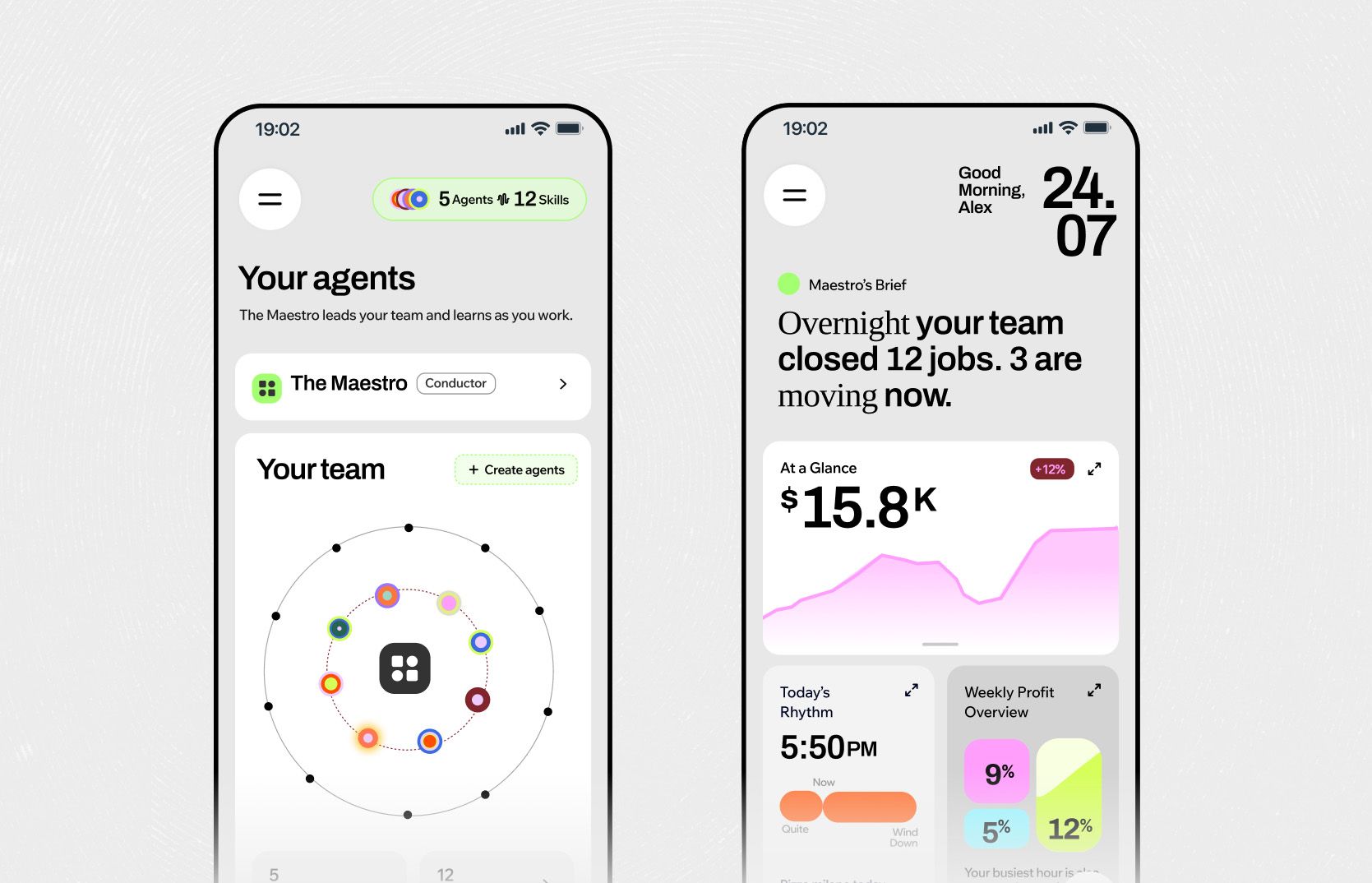
Now, the company is harnessing its proven technology and deep experience to power a coordinated AI team that's designed around you. Symphony by Wix is the company’s standalone AI agent platform that connects to all your tools and workflows – and synchronizes all the layers of your business.
Because Symphony is an independent product, you don’t need a Wix website to use it. It’s also incredibly easy to get started. Using a natural language prompt, you just tell Symphony about your ideas and pain points – and in minutes, it creates an intelligent team of specialized employees that work together around-the-clock.
Symphony is powered by “Wix wisdom," and it runs deep. Let’s say you own a yoga studio in Tokyo. When feeding Symphony with your business goals and challenges, it leverages the intelligence of two decades and 300 million Wix businesses to identify industry market trends and geographic context – so agents can make hyper-relevant recommendations and take action on improvements.
What I love about Symphony is how it understands the needs of your small business. There’s no code to mess with or complicated learning curve. You don’t even need to have all the answers when you start. As your goals expand, so does your AI team. And because small business owners like you are always on the go, Symphony offers an elegant mobile app experience and connections to wearables like smartwatches – so you can talk to your agents from anywhere.
Source: Symphony by Wix documentation
Who it's perfect for
Owners and lean teams whose work spans several functions, especially those who need help coordinating activity across their existing tools. From fitness coaches to wholesale distributors, you can read how Symphony is “staffing” small businesses by reading actual user stories.
The AI advantage
Simply put: Symphony is AI to the core. Its agents can handle both tactical and strategic tasks like customer outreach, marketing, booking and scheduling, research, finance, design, and more.
Symphony’s AI is proactive. It doesn’t wait to be asked. It can spot opportunities for improvement and submit them to you for approval before they run. Ask it to analyze feedback on your competitors or why your customers are churning, or have it create a plan for announcing your new brand to the market. Tell it everything, and it will keep actively suggesting ideas. In some cases, it can even uncover hidden value; for example, a salon owner found an extra $40K in revenue by asking Symphony to review its client records.
From a UX perspective, Symphony feels lightweight and familiar, reflecting the best parts of other AI assistants and engines. You have a constant feed of your chat history, and an easy-to-use prompt window for writing or dictating.
When you first build your space in Symphony using Maestro – your dedicated AI conductor – it will assign specialized agents based on your stated task and objectives, determining which one to “hire” for your business (like a bookings agent, a content agent, or a follow-up agent). You can also create and train your own custom agent, giving it a name, personality, and permissions for specific actions.
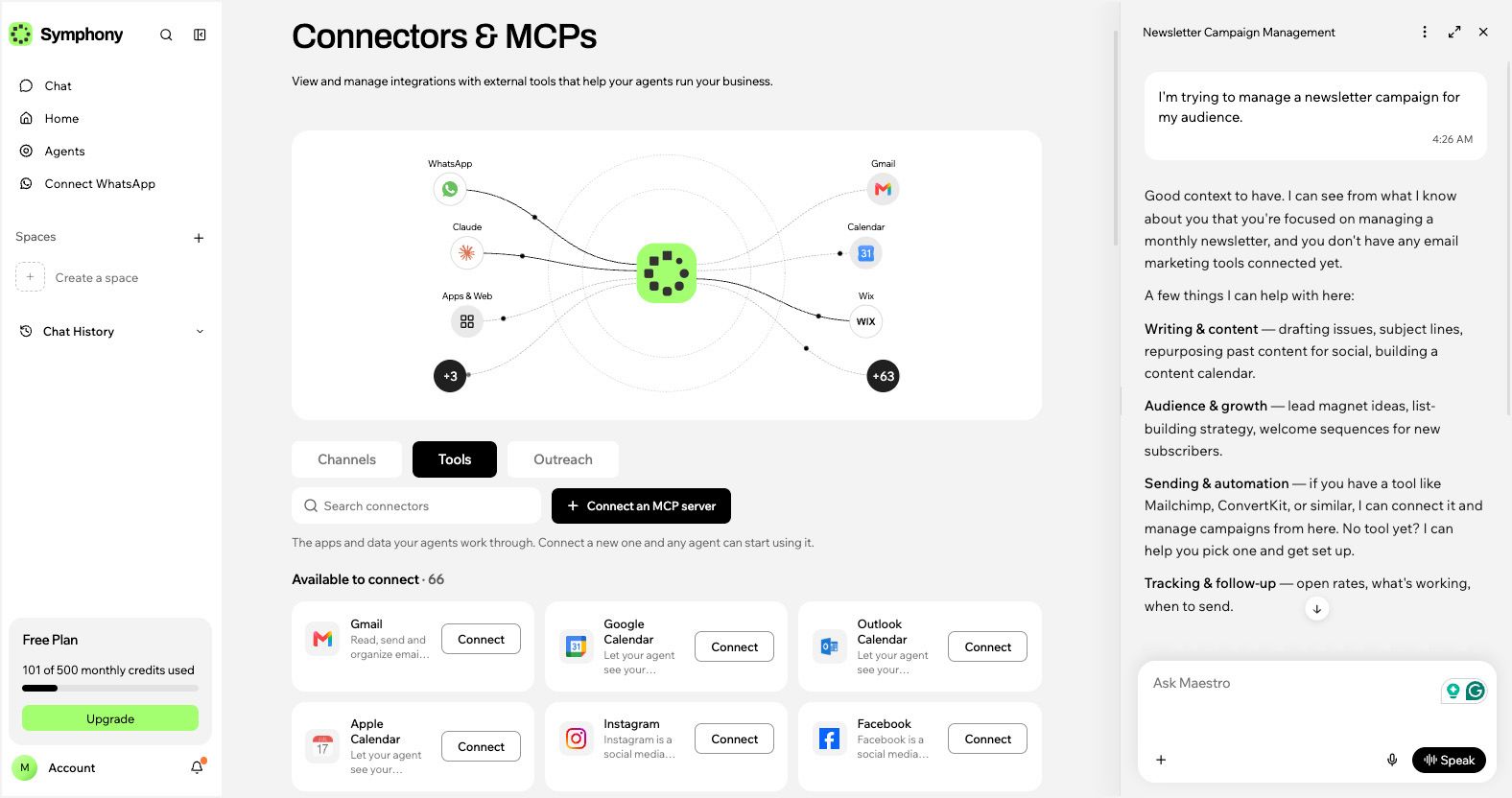
Symphony connects with almost 70 digital tools, many of which are on this list. Hook up Instagram, TikTok, or LinkedIn and simplify your social posting. Add WordPress or Shopify to publish web content in seconds. There are also some deeper back-office connections available if you’re a Wix website user.
For more advanced businesses with developer chops, Symphony lets you connect a new MCP (Model Context Protocol) server, so you can expand your connections to other third-party systems and applications. If you’re an AI coder, you can grant access to coding agents like Gemini, Claude Code, and ChatGPT. There's also a great feature called Symphony Packs, which enable you to share your preconfigured agent team and routines with agencies and partners.
Source: Symphony by Wix
There are so many use cases for Symphony, but let's focus on one: newsletters. They’re high-touch, cost-effective marketing tools for maintaining trusted relationships and driving sales. Newsletters land directly in people’s inboxes, providing a targeted opt-in channel that enhances any integrated strategy.
One of the biggest obstacles with maintaining a newsletter program is the brute-force work of execution. But Symphony can lighten the load by reviewing your emails and previous newsletters to provide a slate of ideas. This “brainstorming” step makes the process easier – even more fun – than ideating on your own.
After reviewing your newsletter outline, Symphony can generate a first draft based on your own voice and writing style, so you’re more in the editor’s seat. Once you’re happy with the final draft, you can run a test email through Symphony’s outreach system and then connect via MCP to a tool like Mailchimp and broadcast to your house list.
There’s a good reason why they call it Symphony: it orchestrates the complexity of your small business. You have every instrument you need to produce the right music for growth, and you can conduct it all in one place. For this reason, Symphony is a great foundation for growing your AI-powered business.
2. ChatGPT
A versatile AI assistant for everyday business tasks
If you’re not already using ChatGPT, it’s the “OG” pioneer in AI assistants. From desktop to phone, it’s a powerful go-to resource for general search, decision-making, and managing everyday tasks without switching tools.
What makes ChatGPT a great asset for any small business is its versatility. If you’re wearing a lot of hats (which you probably are), it can help you generate content on the fly, from words to images to video. I’m also a fan of Claude, which tends to perform better when reviewing longer-form content and performing deeper analysis. But for smaller teams, ChatGPT has an edge with an all-in-one platform that’s just easy to use.
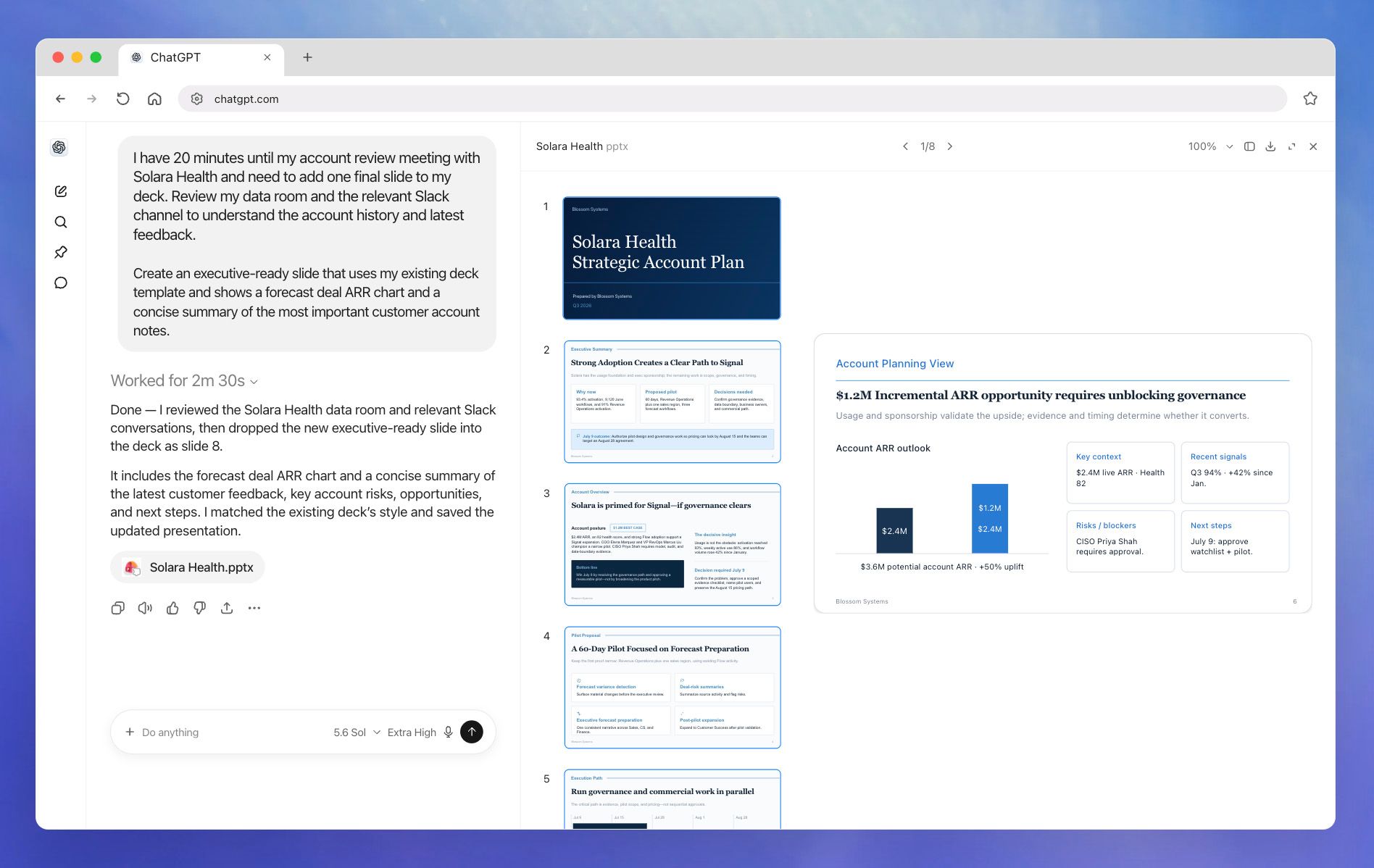
One of the things I really like about ChatGPT is the ability to keep refining. An initial idea can become an outline, a draft, and even a final product as you add context and feedback. It also offers one of the best conversational workspaces, where you can “talk” with your assistant like a real person on your team.
Source: ChatGPT documentation
Who it's perfect for
Owners, marketers, and business generalists who need flexible help with writing, brainstorming, research, and visual concepts.
The AI advantage
ChatGPT is an AI workhorse. Use it to draft product descriptions, summarize documents, explore campaign ideas, and generate images from written or spoken prompt instructions. A retail shop owner could use it to develop a seasonal promotion, create email copy, and experiment with an accompanying visual – all within the same conversation.
While ChatGPT can produce final output, I would treat it as base material to shape with your own human voice and expertise, particularly when it includes factual claims or promises to customers. If you’re using it for general search and citations, remember to always check your answers for accuracy.
3. Grammarly
An extra editorial eye on your business content
Grammarly is a no-brainer for your small business AI stack. Every customer email, proposal, and website paragraph represents your brand, and this handy tool is your “ride or die” in every document you touch. It helps bring more care to your everyday communications, especially when writing is one responsibility among many.
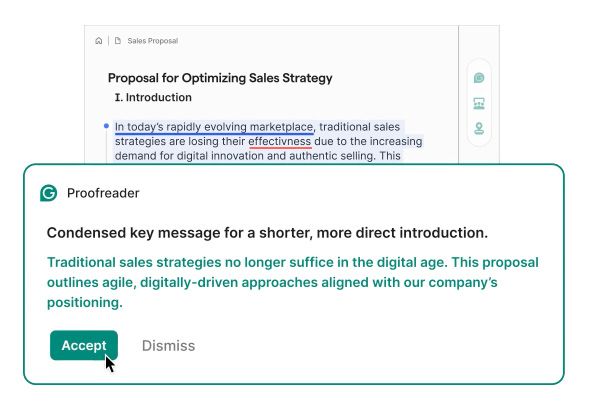
For a small team without a dedicated editor, Grammarly is a godsend. It proofreads and double-checks your content like an editor on your shoulder. But it goes beyond just the structural considerations: a quick message you’re writing might be grammatically correct, but it could still sound abrupt, confusing, or unnecessarily complicated. Problems worth catching before someone clicks “send.”
Source: Grammarly website
Who it's perfect for
Owners and employees who regularly write customer communications, proposals, marketing copy, and internal documents.
The AI advantage
Grammarly's AI assistant, Go, is a staple across every app, tab, and workflow. It combines trusted writing expertise with context-aware agents that help you write, reply, and create everywhere. Both its browser and desktop tools work in the places where people already write (like a Word document or your email client), reducing the need to move every draft into a separate application.
Consider a transaction with a frustrated customer. Grammarly's AI can help refine the next steps in a response email, suggesting the right tone based on your response and fixing any errors on the fly. It’s also another layer of validation on top of AI-generated content that you might be editing or rewriting.
4. Canva
AI design tools that make any business look bigger
Small businesses need more visual content than ever. Social graphics, presentations, flyers, menus, promotional materials, YouTube videos… the list goes on. In the past, this required a graphics pro with a deft eye, and sometimes multiple partners based on the discipline.
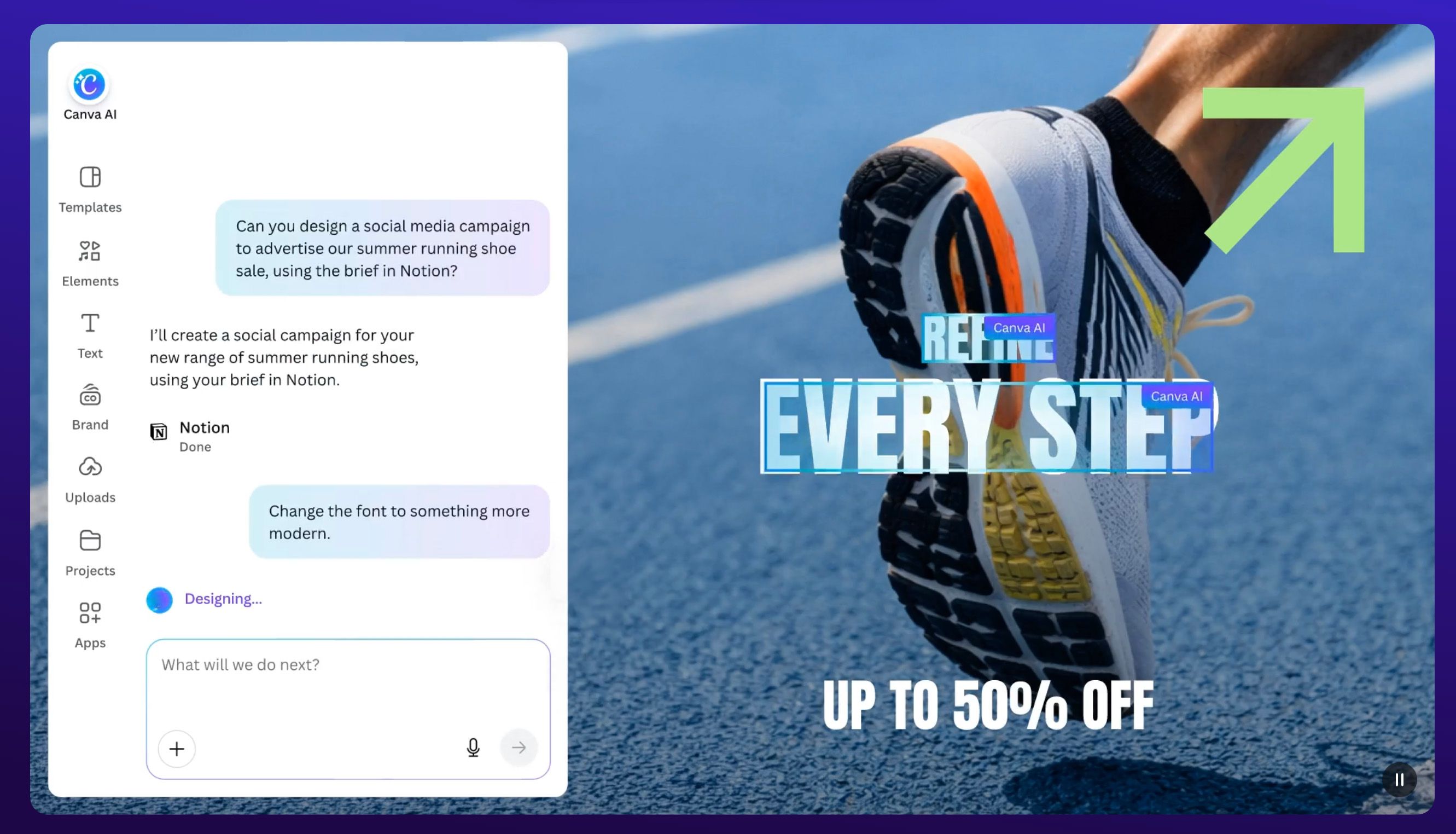
Canva has made beautiful design accessible to anyone, combining templates and editing tools that help you move from an idea to a finished design. Unlike Adobe's Creative Cloud – which includes powerful tools like Photoshop and Illustrator, which both offer AI features – Canva makes everything easy with an intuitive UI, minimal learning curve, and an integrated toolset.
I’ve been a Canva user for years, and its real value comes into focus when a campaign requires multiple assets. A consistent visual identity becomes easier to maintain when the team can work from shared designs instead of rebuilding each piece from scratch. This is where AI is now making the entire process faster and easier – and delivering a brand that looks and feels more sophisticated.
Source: Canva website
Who it's perfect for
Owners and small marketing teams producing regular visual content without a dedicated designer.
The AI advantage
Canva’s AI is your constant creative partner, helping you generate designs as starting points and easily refining them through production. You can edit photos and create visual elements within its editor, and using its AI assistant, adjust and refine the results.
For a café promoting a new menu, that might mean developing a visual concept and adapting it into a social post and an in-store graphic. But the human team still supplies the taste by choosing appropriate imagery, assessing the readability, and making sure the finished work feels like the business.
5. HubSpot
A shared home for customer relationships
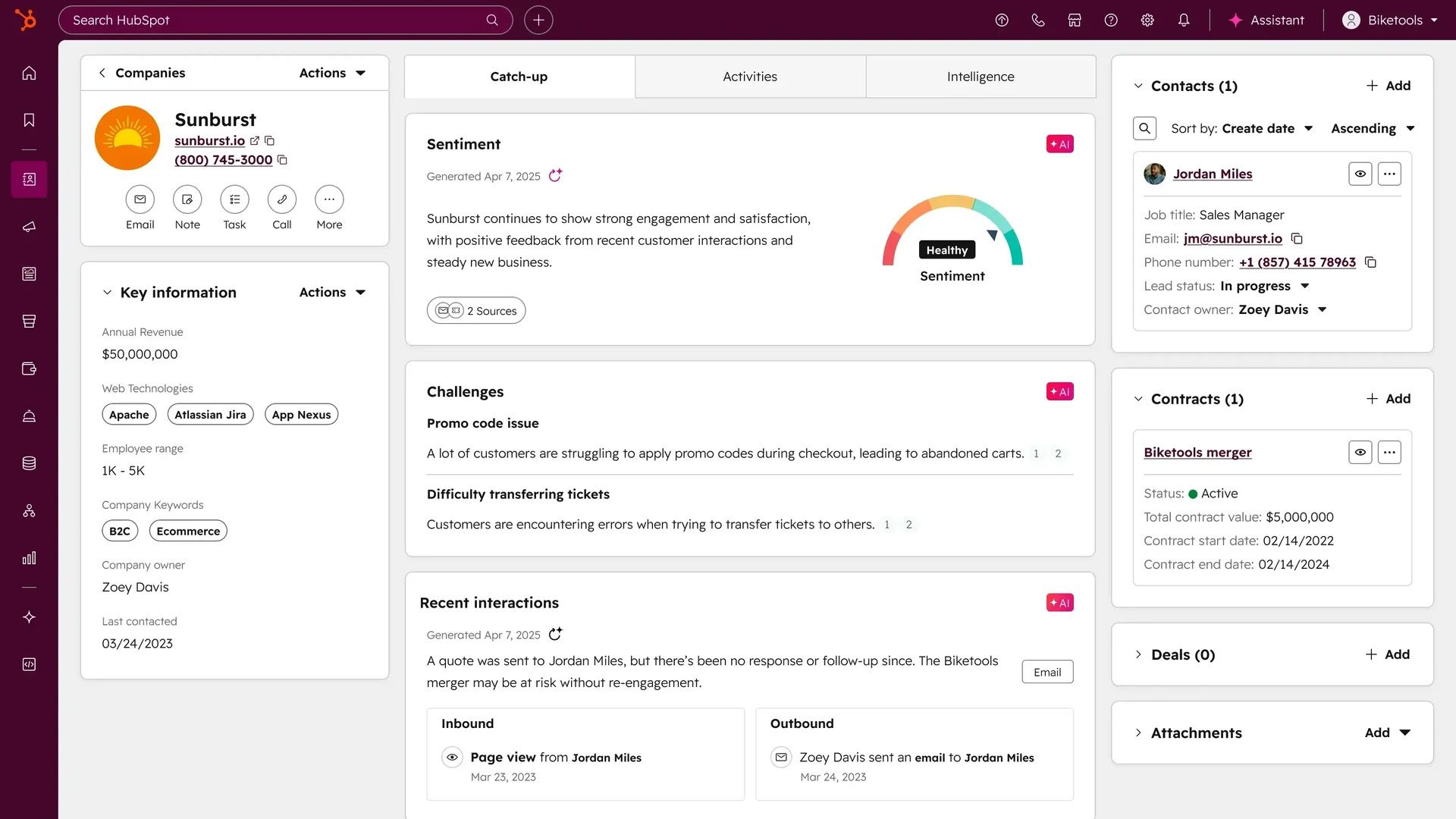
Small business owners can’t remember every conversation or respond quickly to every service question. A shared CRM (Customer Relationship Management) can give you and your team a stronger starting point when handling accounts – and HubSpot is one of the best for staying on top of your touchpoints and winning the growth game.
HubSpot brings customer details, opportunities, and activities together in one place, helping businesses maintain continuity as relationships move between people and the various stages of your sales cycle. HubSpot also brings your CRM, content, and campaigns together, allowing you to expand your capabilities in one place.
Over the years, I’ve used both HubSpot and Salesforce (the market leader in the CRM space), and each has its advantages. But for small businesses, I put my money on HubSpot’s intuitive self-onboarding that doesn’t require expensive consultants.
Source: HubSpot website
Who it's perfect for
Small sales and service teams that need organized customer information and a more consistent approach to follow-up.
The AI advantage
HubSpot has layered AI across its customer platform, including tools that help create personalized communications using CRM context. Within Marketing Hub, AI-powered email features can connect content creation to information about the people receiving it. There are also specialized agents that can automate and enhance your demand and prospecting.
For a small business, HubSpot can make outreach more relevant and successful without rebuilding every message manually. Its AI customer agent can help delight customers by answering common questions, giving small service operations a powerful teammate that can answer repeat questions and even resolve issues that might be hanging in your queue.
6. Otter.ai
AI memory for your meetings
A great conversation loses its value if you can’t capture the details. Scribbling on notepads is fine, but it can also be distracting. Having a record also makes it easier to resolve any uncertainty when breaking down the takeaways.
Otter.ai is like your personal scribe, preserving your meetings, interviews, and client discussions – so you can dig into the most useful information beyond the call. It’s incredibly easy to use, and its transcription accuracy is off the charts.
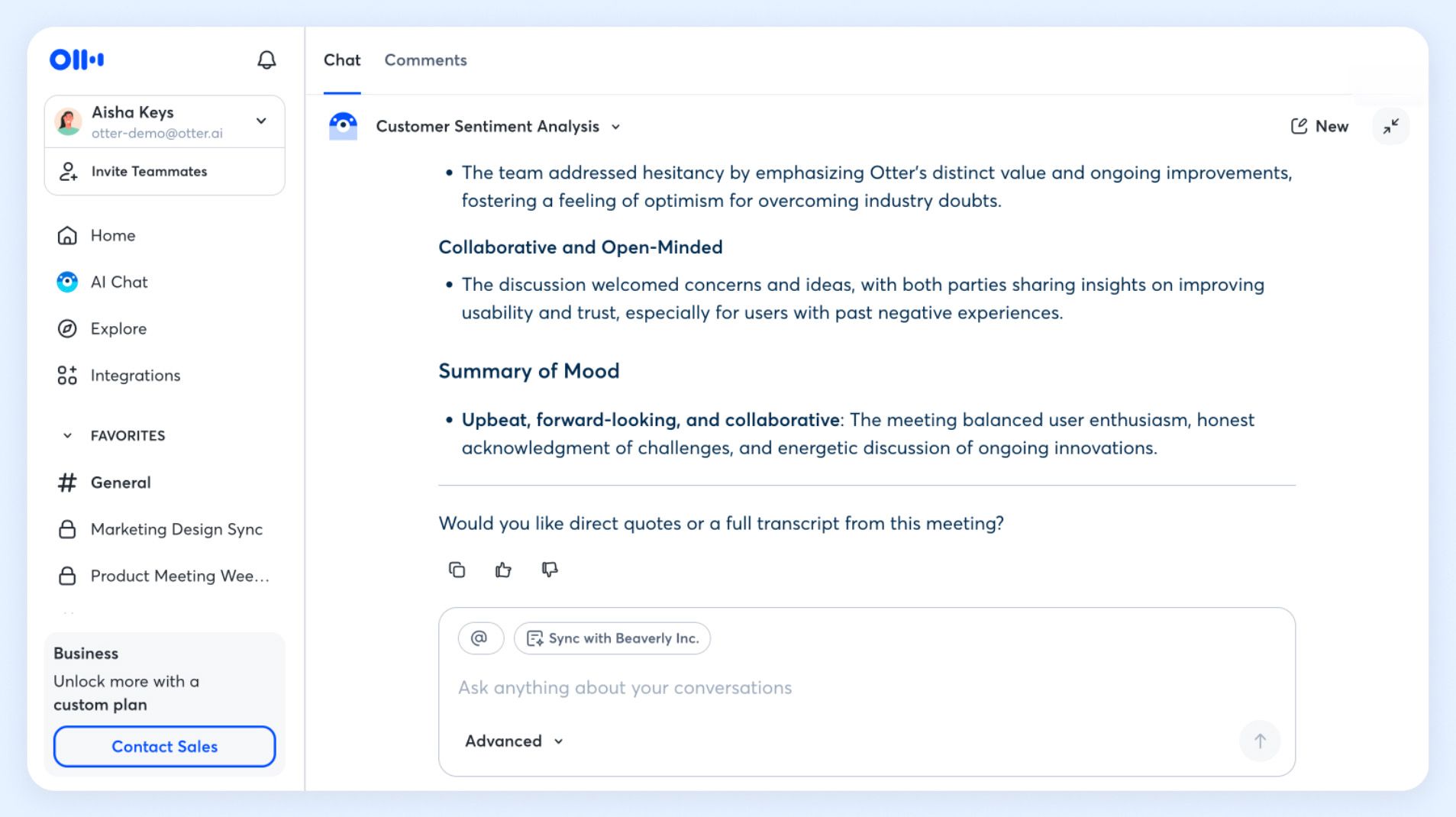
Every business needs video conferencing like Zoom, Google Meet, or Microsoft Teams (those are in my order of preference). They’re table stakes. And while Zoom can also record and transcribe your meetings, it’s more like a machete than a scalpel. That’s why Otter is an indispensable complement to those tools, giving you surgical control to summarize, isolate quotes, ask questions, and glean more insights from your conversations.
Source: Otter.ai Help Center
Who it's perfect for
Consultants, client-service teams, publicists, and business owners whose work depends on frequent conversations with customers and other personalities.
The AI advantage
Otter combines speech transcription with AI-generated summaries, decisions, and action items. It can turn a lengthy discussion into a more manageable account of the key points and proposed next steps, with searchable transcripts available for deeper review. Simply ask the prompt a question, and it gives you clear answers, specific quotes and timestamps, and more. You can also have it draft outlines for articles, social posts, and other content based on your transcript.
What’s nice is that Otter’s pilot can seamlessly connect to Zoom and other video conferencing apps. After a client briefing, a team could use its Otter recording to prepare a follow-up and check the original conversation if details need clarification. In seconds, you can review the names, numbers, and commitments before sharing the summary.
7. Mailchimp
Put your marketing messages to work
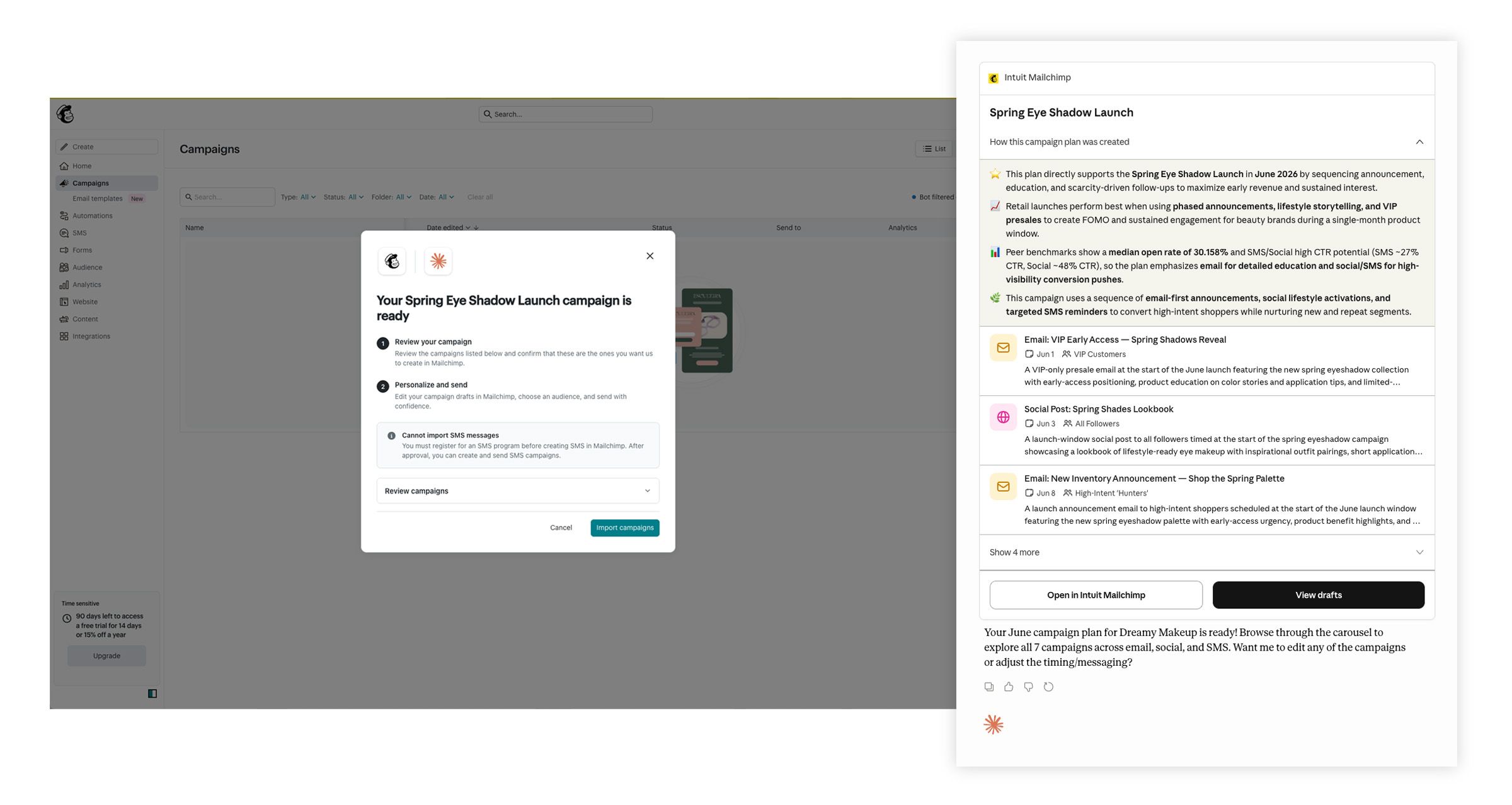
Creating a good promotion is one thing. Getting it in front of the right customers – and learning from their response – is another. Mailchimp brings email creation, audience management, automation, and reporting into a single platform that bridges this gap.
With Mailchimp, there’s no monkey business. It’s easy to use for any small business, giving you a place to develop a consistent communication rhythm. Whether you’re managing a newsletter, pushing a product announcement, or running an email or SMS campaign, Mailchimp helps ensure that your message lands in the right inbox and has the best shot at getting opened.
I’ve used all kinds of email marketing tools, from Constant Contact to Customer.io to Adobe’s Marketo. They all offer unique customer engagement features, and the personalization ramps up as the price tag increases. Most platforms offer free trials, so it’s worth doing your homework. But Mailchimp is generally a great fit for small businesses, and with its evolving AI features, it's getting even better.
Source: Mailchimp website
Who it's perfect for
Owners and small marketing teams building an email audience and nurturing repeat business.
The AI advantage
Like QuickBooks, Mailchimp uses Intuit Intelligence to power its Analytics AI, which sheds light on your campaign performance. You can see which emails and automations are moving the needle, and you can optimize your strategy with recommendations based on what you’ve sent and sold. There are also generative content tools, like inline text generation to write email copy faster, and pre-send tips to boost delivery performance. Mailchimp also connects to ChatGPT, Claude, Perplexity, Codex, and Google Workspace, so you can build email and SMS campaigns with your AI assistant of choice.
A retailer could use Mailchimp’s AI assistance to generate promotional copy, then review campaign analytics to assess which messages attract the most engagement. By connecting creation with learning, future campaigns can build on past performance and drive more results.
8. Notion
Where projects and business knowledge live
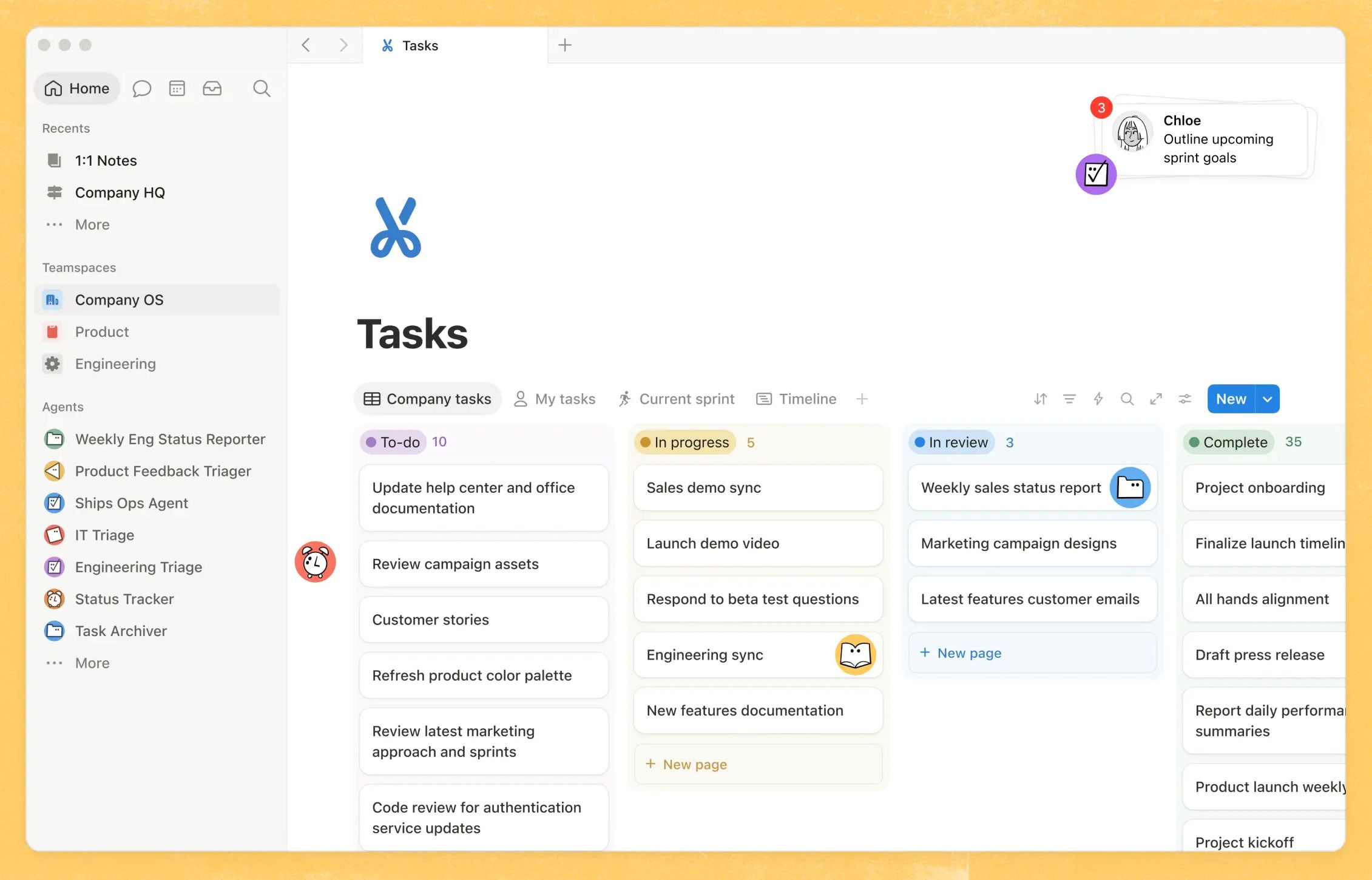
When you’re running a small business, it’s easy for things to slip through the cracks. Information gets scattered across spreadsheets, documents, email threads – and even inside your head. Staying organized can be a struggle, and this is where Notion brings the motion. It connects all your documents, customer details, product specs, project information, and shared knowledge into a unified workspace that you can shape around your business processes.
I like Notion because it can search other tools and keep your most important information closer together. Can't remember if the info you need was in an email, slide deck, or Slack message? Notion can find it. It’s also a dynamite task tracker, a lightweight CRM, and a knowledge base that stores critical documents like your company’s SOPs, campaign briefs, onboarding processes, and more.
Source: Notion website
Who it's perfect for
Small teams coordinating projects, documenting processes, and building a shared source of business intelligence.
The AI advantage
Notion’s AI is designed for teamwork and complexity. It can help you draft and improve documents, search for information across your workspace and connected apps, and create or populate databases. The AI meeting notes are also super handy, and the built-in agents make it easy to automate repetitive work. With slick usage and analytics dashboards, you can also track your ROI.
A marketing team can use Notion to manage the lifecycle of a project, starting by shaping a campaign brief, then finding relevant information from previous projects spread across their Google Drive, GitHub, and other sources.
9. QuickBooks
Get more clarity around the numbers
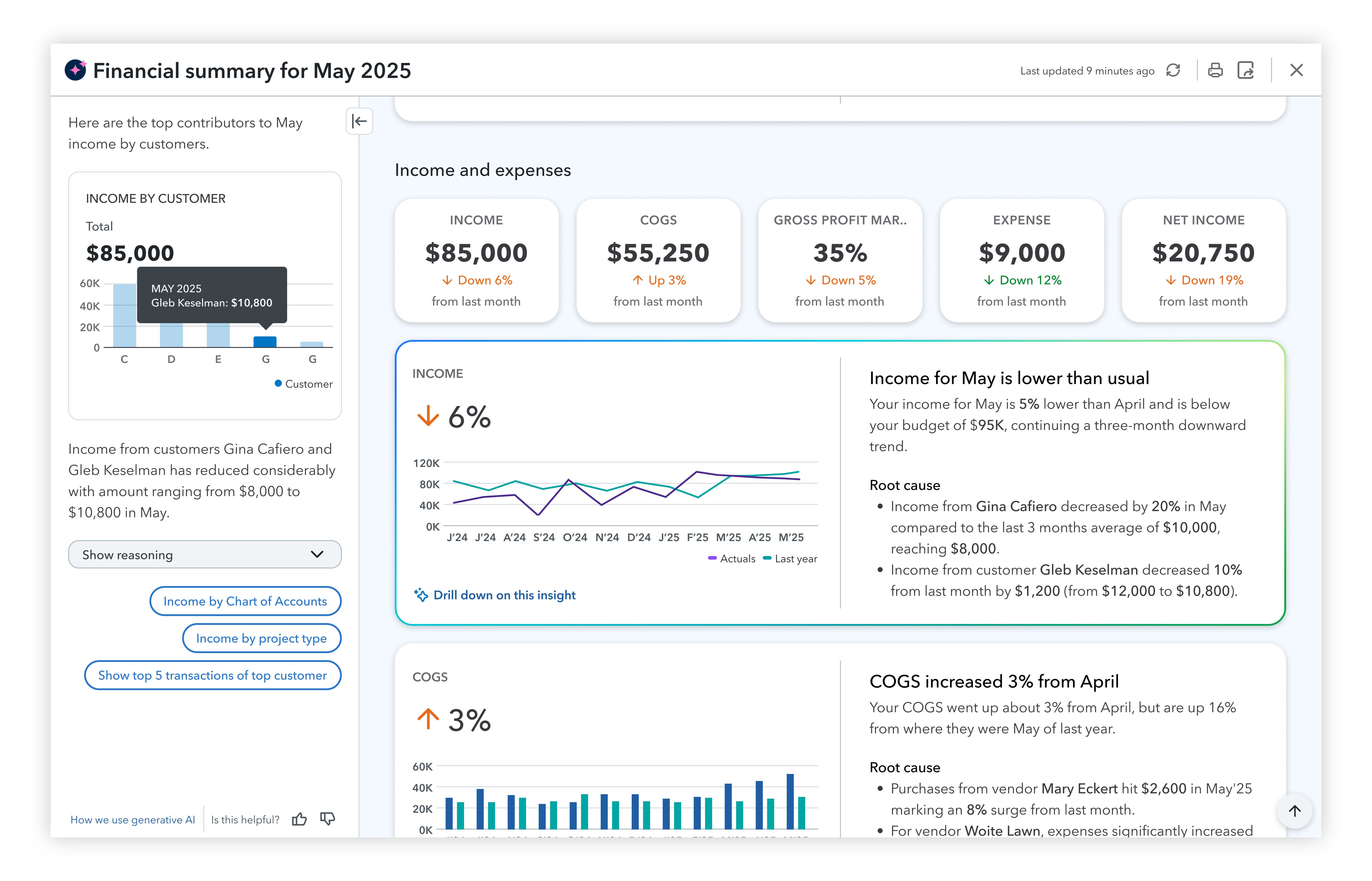
With every small business, the buck stops with your bank account. You need a clear view of what’s coming in, what’s going out, and where you stand with your financial health. QuickBooks brings those activities together, helping business owners and bookkeepers keep track of the records and drive daily decisions with confidence.
I’ve used QuickBooks at multiple business ventures, and it continues to evolve its value. It helps you spend less time pulling information together and more time understanding what it all means. Case in point: a busier sales month is easier to evaluate when expenses and unpaid invoices are visible right alongside your revenue.
There are certainly upstream alternatives like Sage that offer deeper workflow controls and advanced reporting, and downstream tools like FreshBooks that are ideal for independent freelancers. But for my money, QuickBooks is the quick win for small businesses. And with new layers of AI and powerful in-app agents, it's bringing new levels of automation to its unified platform.
Source: QuickBooks press release
Who it's perfect for
Owners, bookkeepers, and administrative teams managing everyday business finances.
The AI advantage
QuickBooks uses AI to connect your accounting and financial data to provide a comprehensive view of your business. Armed with deep insights, it categorizes and reconciles transactions and flags inconsistencies for review. Using the power of Intuit Intelligence, it can speed up everyday tasks while leveraging its Customer AI to surface new leads, Payroll AI to run payroll from anywhere, and Finance AI to provide a snapshot of your business health. You also have access to professionals if you need assistance.
With QuickBooks, an owner can easily investigate a change in performance or direct a bookkeeper’s attention to records that need checking. It also highlights patterns, trends, and future forecasts, so stakeholders can plan with more confidence. AI prepares and surfaces all this information, but humans are always in control of making any final decisions.
10. Slack
Keep your team connected to the conversation
Slack might seem like it’s overkill for a small team, but we all need somewhere to collaborate, ask questions, post updates, and work through decisions. More than any other tool in this category, Slack organizes your conversations in a shared space, creating intuitive channels around your projects, customers, discussions, and business operations.
I’ve been in groups using other products like Microsoft Teams, which offers a slate of capabilities that are geared more for the enterprise. Slack reaches up there, too, providing on-the-fly “Huddles” that make it easy to call a teammate to chat and share screens. Pound-for-pound, Slack is less cumbersome and easier to deploy.
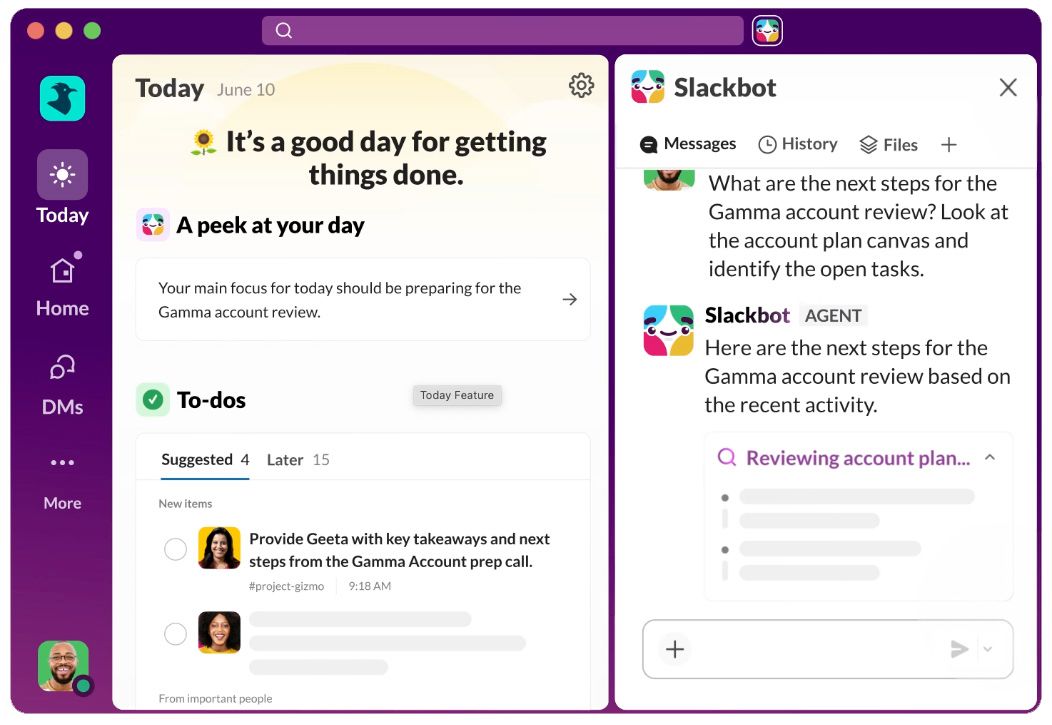
But a lively workspace creates its own challenge: keeping up. For a small business owner moving between appointments or an employee returning from time away, finding the important developments can become another task. This is where Slack’s AI is becoming indispensable.
Source: Slack website
Who it's perfect for
Teams of two to two hundred who are coordinating daily work across different locations, schedules, and responsibilities.
The AI advantage
Slack’s handy AI “Slackbot” is your ultimate personal AI agent. It can summarize busy channels and long threads, giving you daily recaps of what happened across your collaborations. Ask it questions, and it's ready to answer with recommendations and next steps. Slack's search capabilities also help surface information from conversations and, with supported configurations, connected app sources. Best of all, most of the tools on this list connect seamlessly with Slack through its app marketplace.
For a manager catching up on a launch discussion, a Slack summary can provide a starting point before reviewing the underlying messages. The benefit is easier access to the team’s collective context, with less dependence on someone having to explain everything – again.
Bonus: Descript and DeepL
Not every small business will need advanced video editing, but for owners and marketers that want to turn their expertise into more engaging content, Descript is amazing. You can publish demos, interviews, or even podcasts – and its AI features make transcribing recordings easier, so you can cut and rearrange media by editing text. Descript also provides background-noise removal, voice enhancement, editing and generating video, and creating shorter clips from longer recordings.
These days, customers are everywhere, and having reliable translation opens up audiences across the globe. While many tools offer onboard translation and localization, DeepL takes quality and reliability to the next level. It uses advanced AI to translate files, documents, speech, and everyday correspondence – capturing context and idioms better than any other platform. It also allows you to control your tone at a granular level.